Friday, March 24, 2017

How to Fix Browsers are not working,but internet connection is fine

Some malware variants modify Internet browser settings by adding a Proxy Server. In these cases, you will be unable to visit any websites, and thus not able to download the required software to eliminate the security infections. Other types of malware change the computer's DNS settings or add various entries to your operating system's Hosts file. By altering these settings, computer viruses can cause redirect issues or completely block the Internet connection.

Follow me to Solve your Problem,

First of All this Step is optional but i Recommend doing it .

Step 1: Reboot into Safe mode with networking.( while the system is booting keep pressing F8 ).


After it boots Successfully , Press  Start> In search box type cmdRight click on cmd.exe
or / Press Run and type : cmd.exe

However you can still do this without Safe Mode but make sure you are running cmd as an administrator 

Step 2:  

Type in the following, followed by enter

netsh winsock reset

Enter

Restart PC

Step 3 :
Open cmd once again 

Type in the following, followed by enter for eachipconfig /flushdns

Enter

ipconfig /release

Enter

ipconfig /renew

Enter

Step 4: 

Test if the browser can now open browse the web , if no  no matter what browser you use you have to open Internet Explorer
press on top and right click, choose menu bar.
press on tools ,choose Internet Options ,Choose Advanced press on Restore Advanced Settings then Press Reset .

Monday, December 5, 2016

How to Display & Fix Cisco Networking Academy Flash Content (CCNA v5)

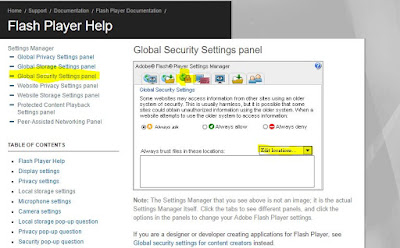
There is a problem to display the curriculum by default as it contain embedded flash animation , CCNA Exploration could open but it won't launch.


Problem Preview : 


Solution : 

First of all make sure you have Adobe AIR and Adobe Shockwave Installed on your computer.
you could install here;

Then follow these steps : 


1- Right Click on the Flash Content and Press Global Settings.


2-Choose Global Security Settings and then Press Edit Locations.


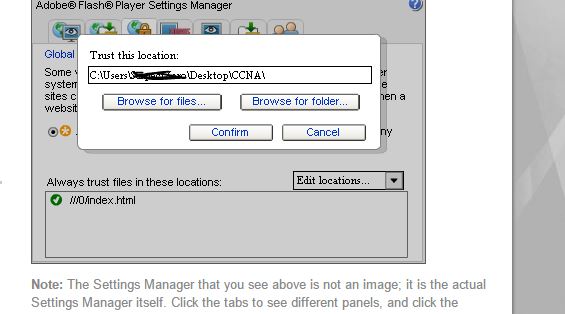
3-Press Add location and then Browse by Folder , Put The PATH of your CCNA Course Folder


4-Press Confirm and Reload your Browser .


DONE ENJOY, BEST OF LUCK

Sunday, June 26, 2016

How to Fix Snapchat won't let you add friends ( toast message saying "Forbidden" )

How to Fix Snapchat won't let you add friends  and a toast message will appear saying its "Forbidden" 

or  if so you may see a message when you try to use Snapchat that says “The network you are connected to has been temporarily blocked because of suspicious activity" 


The Solution is Simple Follow these Steps :-
1-Download  Cloud VPN Cloud VPN <==== OR ===> Opera Free VPN
2- Install the Application 
3- Open it 
4- Click on TAP TO CONNECT


5- Open SnapChat and try to add now it should be working just fine ;-) 

Tuesday, June 21, 2016

How to Fix Gyroscope and Accelerometer/orientation sensors not working on Xperia

Solution is simple, you just need to boot once into Safe Mode and Exit.

How ?


If you experience any problem with your phone, booting it into safe mode can be a good idea to check if any third party applications might be involved in the problem you’re having.

If you run your phone in safe mode for a while and you don’t experience any problem, the problem you’re having is most likely related to a third party app that you’ve installed.

How to boot into safe mode differ from models to model and it can also be different depending on firmware version but this topic will explain to you how to do it.

Turn on and use safe mode


  1. Press and Hold the Power key then Touch and keep holding the Power OFF.


2.  Tap OK on the Safe Mode prompt. The device will restart in safe mode.


3.  safe mode.


Turn off safe mode


To turn off safe mode, follow these steps:

  1. Touch and hold the Power key.
  2. Tap Power off.
  3. Once the phone is off, touch and the hold the Power key again to restart.

Tuesday, September 16, 2014

How to Unbrick & Fix Acer Iconia A3-A10 stuck in a bootloop

How to Unbrick & Fix Acer Iconia A3-A10  stuck in a bootloop


Step 1: Download the Acer Iconia A3-A10 Firmware Click to download .
Step 2: Download SP Flash Tool Click here to download . ( you may find different version, but this one only works with A3-A10).
Step 3: Turn off the tablet via long press power button, or insert a needle in a hole between the HDMI and the speaker.
Step 4: Remove the back Cover of the tablet, and unplug the battery 


Step 5: Insert usb cable and connect to PC, let windows install the mtk65xx driver, once its done , download usb view and unistall the installed driver and follow instructions from this site here .
or you can check this you tube video .


NOTE: For window 8/8.1 you need to disable Driver Signature check.


Step 6:  Launch SP Flash Tool.
- Press "File" -> "Open Scatter-loading file..." and choose mt****_Android_scatter_emmc.txt from       firmware folder.- Press "Window" -> "Write Memory". New tab will appear, open it.- Press "Open Raw Data...", choose secouff.img from firmware folder.- Choose EMMC Memory setting.
- Put 0x3D80000 in begin address(HEX).
- Put whatever the value in File Size in Container length (HEX).
-Press "Write Memory", connect turned-off tablet to PC and wait.
-Progress bar will fill with red, then with gray-green, then ou will see grenn circle.
- Disconnect tablet from PC, go to Download tab.

Step 7: -Press "Firmware -> Upgrade" and connect your turned-off tablet to PC.
-Progress bar will fill with purple for few times, then red, then flash with green few times, then yellow, and then (probaly) gray-green. After this you will see green circle.


-Reconnect the Battery, and power it ON.
- Bricked tablet's battery may be extremely low, so put it on charging for 10 minutes after flashing.


Saturday, August 17, 2013

Using PlayStation 3 Controller with Android device !!!

You can never have enough controllers, right?

These wonderful little devices can be used with more than just an actual Playstation 3 of course . so  i’d like to show you how you can play all those awesome Android games with a PS3 controller. The process is easier than I thought, and you don’t need a special OTG USB cable , we’ll be using Bluetooth.

Here’s what you do need, though:
  • An official PlayStation 3 controller. Support for unofficial ones is not guaranteed even if the initial detection works.
  • A rooted and compatible Android phone.
  • A standard mini-USB to USB cable (comes with a PS3, any pretty much every digital camera ever sold).
  • A Windows PC.
  • Sixaxis Controller Application.
Here is a video showing PS3 controller connected to android in action .
in the this video i used Galaxy note (GT-N7000) & Nexus 7.
Games used : PES12 & Dead Trigger.


P.S :if you need any help in rooting your device or installing sixaxis app feel free to contact me on my email: reslan912@gmail.com 

Wednesday, December 5, 2012

Galaxy S III receives Android 4.1.2 Jelly Bean Update, Lots of new features

Samsung releases Android 4.1.2 Jelly Bean update for the Galaxy S III GT-I9300


Samsung has just started to push Android 4.1.2 Jelly Bean update to the International Samsung Galaxy S III GT-I9300.

You might not be able to update your device to Android 4.1.2 Jelly Bean right away as the update is rolling out in phases. So, it might not yet be available for your country or network provider (If Your device is Carrier branded) but don’t worry the update will arrive soon.

Samsung has added a ton of new features in Android 

4.1.2 update for the Galaxy S III, most of the features

 are brought from the Galaxy Note II.


*Some of the Enhancements in the new update:

-Android 4.1.2 – JZO54K
-Multi-View (Multi-Windows Multitasking, same as in Note II)
-Page Buddy
-New Gallery App (Same as in Note II)
-Notification Panel (Notification Panel can now be customized)
-Brightness Slider in Notification Panel Can Now Be Disabled
-Smart Rotation (Screen Display adjusts to your angle of sightings)
-Continues Input in Samsung Keyboard (Like Swipe or Android 4.2 Keyboard)
-Paper Artist App
-Group Cast App
-----------------------------------------------------------------------------------------
Official Firmware Details:
Android Version: 4.1.2 – Build JZO54K
Country: Poland
PDA: I9300XXELKC
CSC: I9300OXXELK4
MODEM: I9300XXELKC
Build Date: 30-11-12
Change list: 566833